Summary
In most CRM implementations, data exposure should be encapsulated for both inside & outside the organization. Sales, Finance, Operations, HR — everyone works in the same system. Collaboration increases. Visibility increases. But so does risk.
This is based on real-world project experience, for a practical example I had implemented for a technology consulting and cybersecurity services firm based in Houston, Texas, USA, specializing in modern digital transformation and enterprise security solutions.
This blog explains:
- 1] Why Security Roles alone are not enough.
- 2] How users can still access data through Advanced Find, etc.
- 3] What Field-Level Security offers beyond entity-level restriction.
- 4] Step-by-step implementation.
- 5] Business advantages you gain.
-------------------------------------------------------------------------------------------------------------------------------------------------------
Table of Contents
The Real Problem: Intra-Organizational Data Exposure
Implementation of Field-Level Security
Results
Why Was a Solution Required?
Business Impact
-------------------------------------------------------------------------------------------------------------------------------------------------------
The Real Problem: Intra-Organizational Data Exposure
Let’s take a practical cross-department scenario. Both X Department and Y Department work in the same CRM system built on Microsoft Dynamics 365.
Entities Involved
- 1] Entity 1
- 2] Entity 2
Working Model
- X Department
- Fully owns and manages Entity 1
- Occasionally needs to refer to specific information in Entity 2
- Y Department
- Fully owns and manages Entity 2
- Occasionally needs to refer to specific information in Entity 1
This is collaborative work. You cannot isolate departments completely. But here’s the challenge: Each entity contains sensitive fields that should not be editable — or sometimes not even visible — to the other department.
Security Roles in Microsoft Dynamics 365 operate at the entity (table) level, not at the field (column) level.
Approach Result Remove Write access to Entity 2 for X Dept X Dept cannot update anything in Entity 2 — even non-sensitive fields Remove Read access to sensitive fields in Entity 2 Not possible at field level using Security Roles Restrict Entity 2 entirely from X Dept X Dept loses visibility — collaboration breaks Hide fields from the form only Data still accessible via Advanced Find or exports This is the core limitation. Security Roles answer: “Can the user access this record?”
They do NOT answer: “Which specific data inside this record can the user access?”Implementation of Field-Level Security
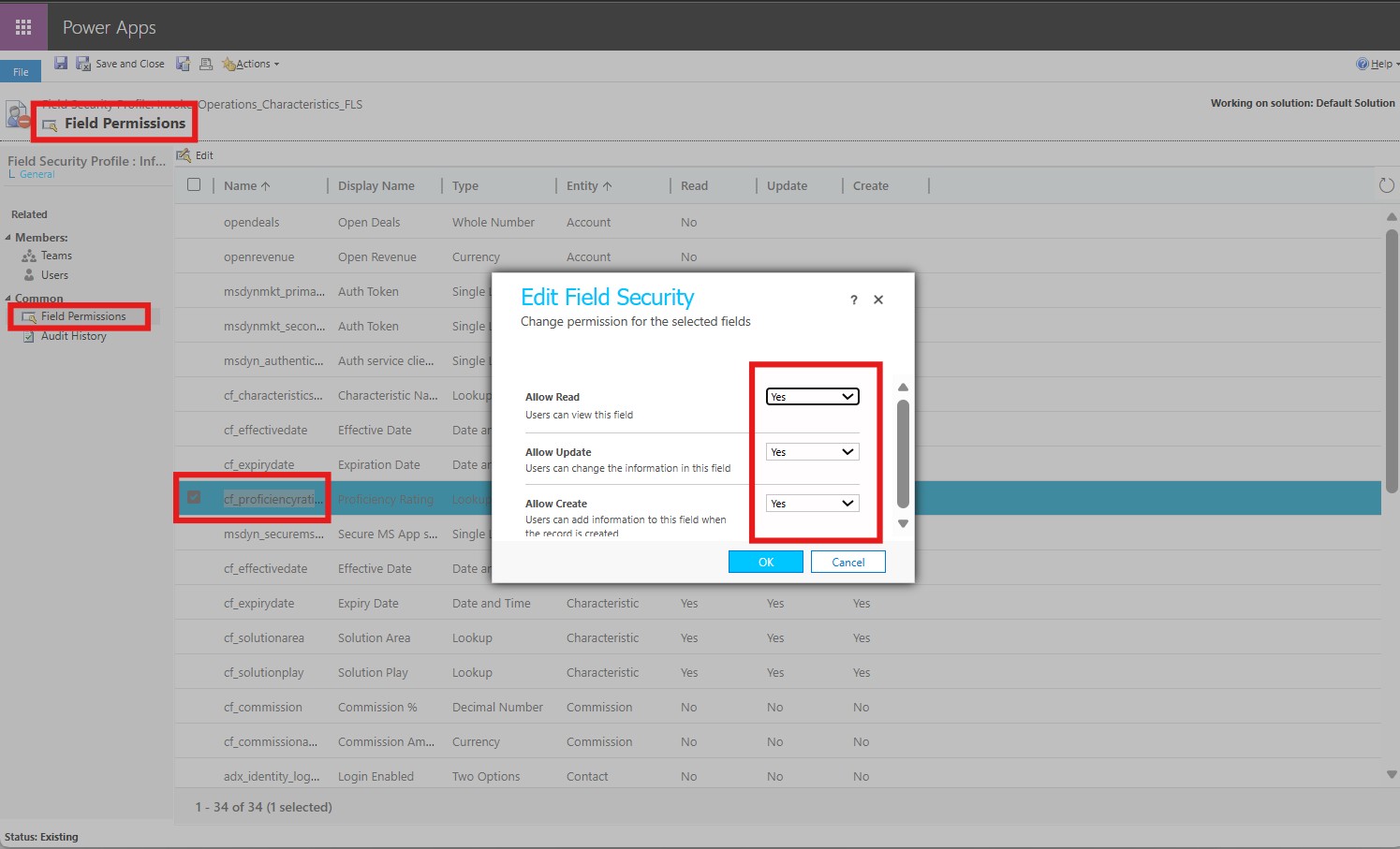
Step 1: Go to your Solution & Identify Sensitive Fields, usually Personal info, facts & figures, etc. e.g. cf_proficiencyrating.
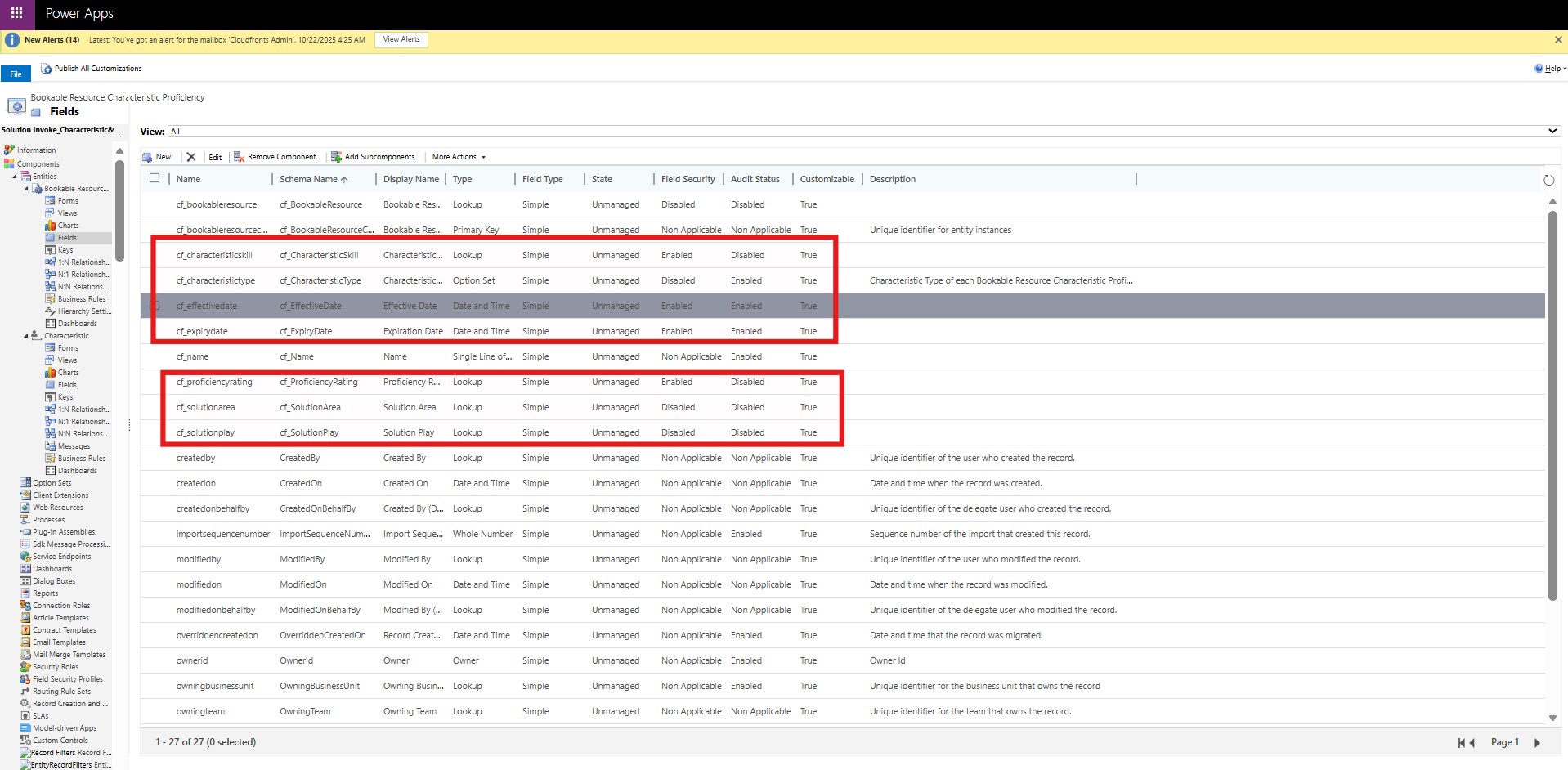
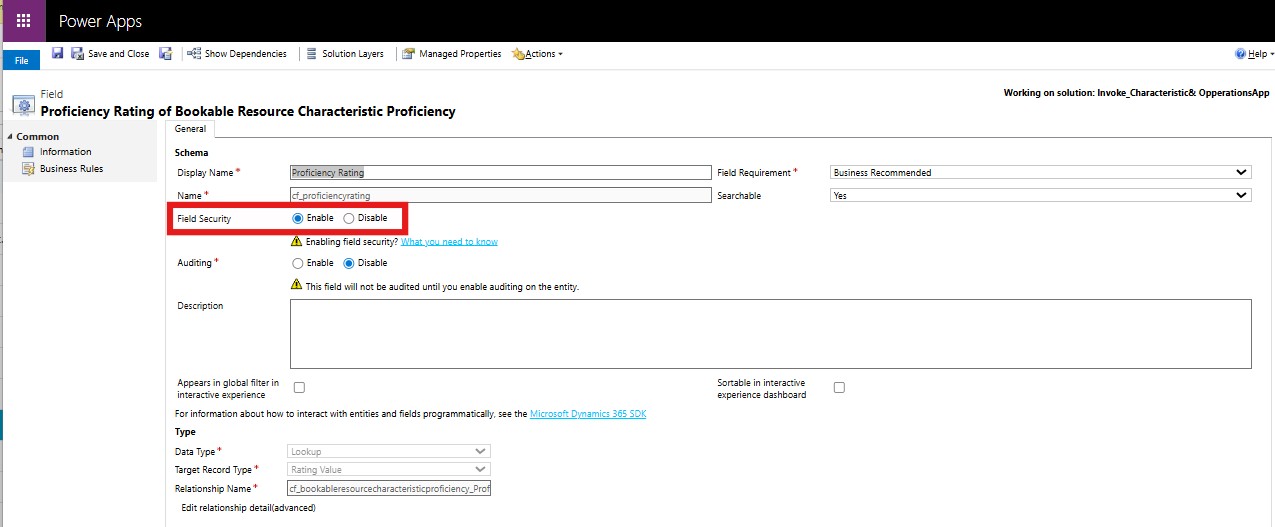
Step 2: Select the field and “Enable” it for Field Level Security (This is not possible for MS Out of the Box fields)
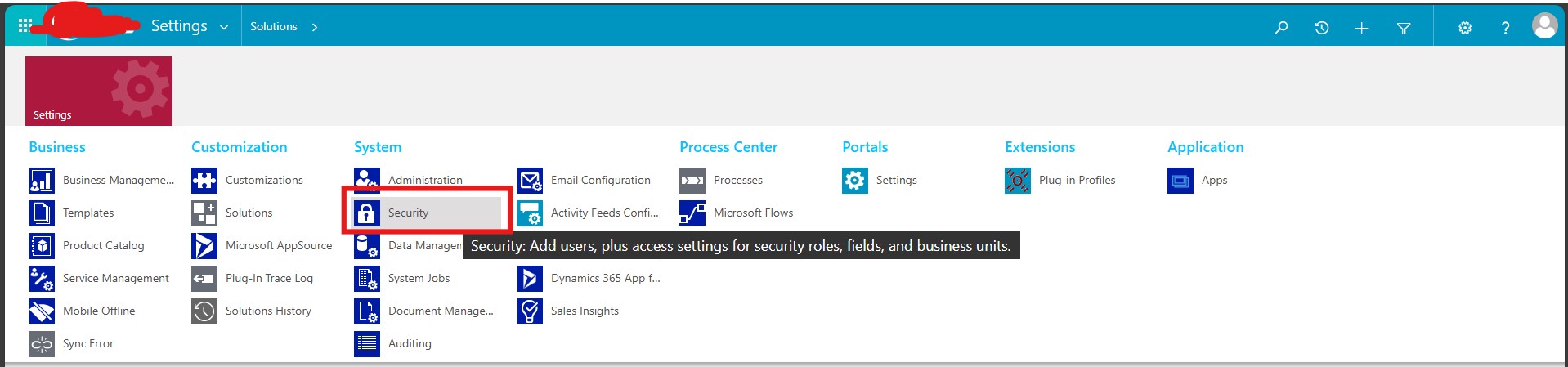
Step 3: Go to Settings and then select “Security”
Step 4: Go to Settings and then select “Security” -> “Field Security Profiles”
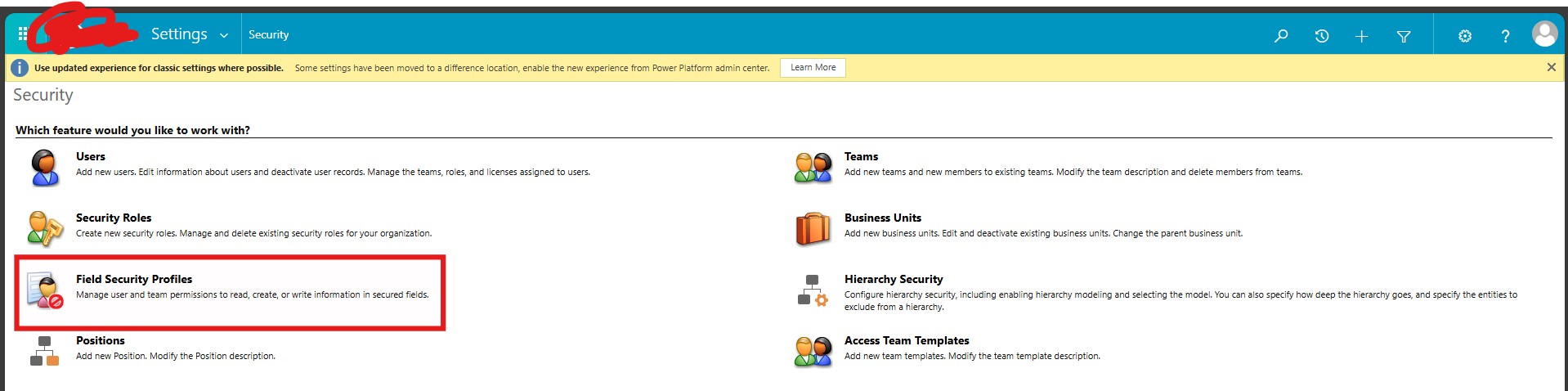
Step 5: Either create or use existing Field Security Profile, as required
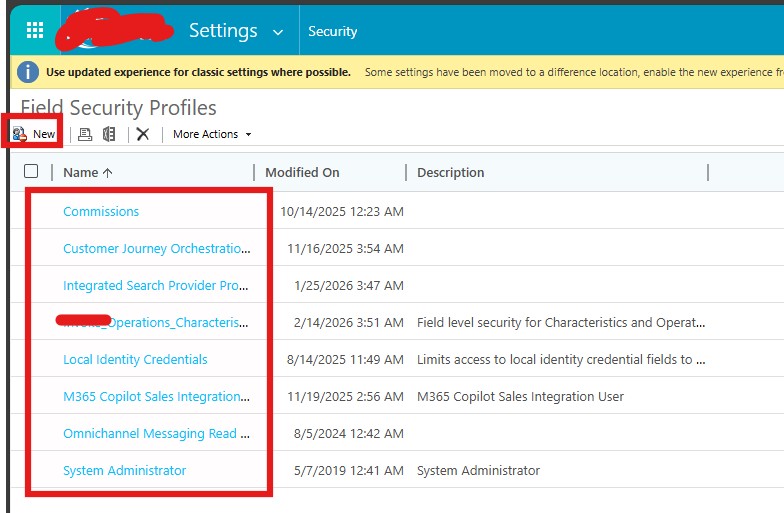
Step 6: Within this one can see all the fields across Dataverse which are enabled for Field Security, Here the user should select their field and set create/read/update privileges (Yes/No).
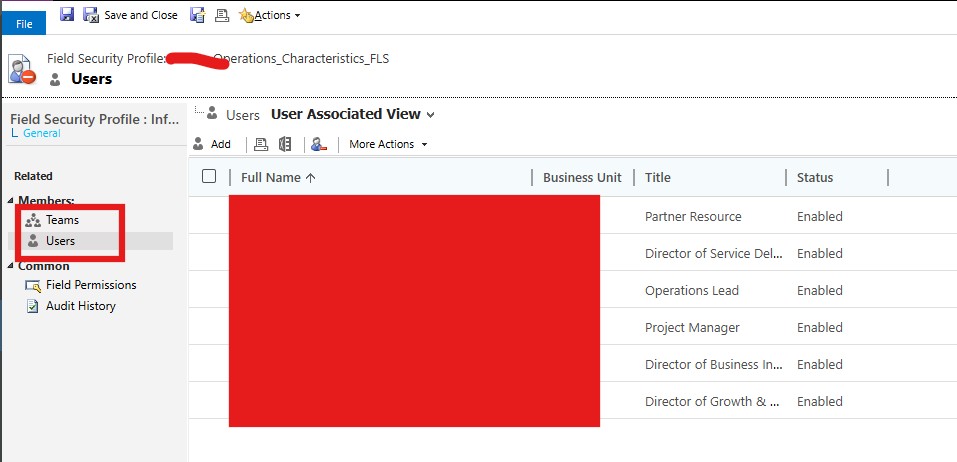
Step 7: Then select the system users, or the Team (having the stakeholder users), and save it.
Results:
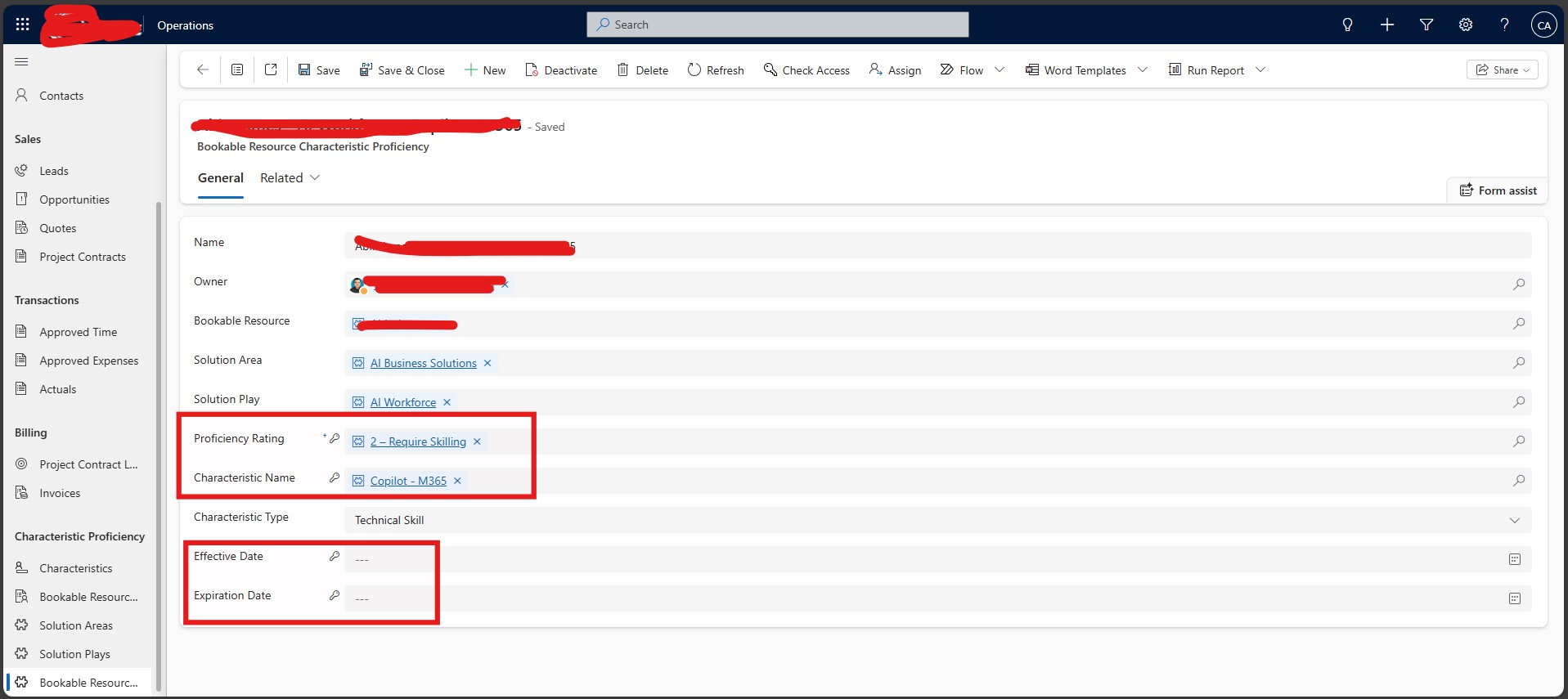
Assume you are a user from X dept. who wants to access Entity 2 Record, and you need to see only the Proficiency Rating & Characteristic Name, but not Effective Date & Expiration Date; now since all fields have Field Level Security they would have a Key Icon on them, but the fields which do not have read/write access for you/your team, would have the Key Icon as well as a “—“.
The same thing would happen in Views, subgrids, as well as if the user uses Advanced Find.

Why this Solution was Required?
The organization needed:
- 1] Cross-functional collaboration
- 2] Protection of confidential internal data
- 3] Clear separation of duties
- 4] No disruption to operational workflows
They required a solution that:
- 1] Did not block entity access
- 2] Did not require custom development
- 3] Enforced true data-level protection
Business Impact
1. Confidential Data Protection
Sensitive internal data was secured without restricting overall entity access, enabling controlled collaboration.2. Reduced Internal Data Exposure Risk
Unauthorized users could no longer retrieve protected fields via Advanced Find, significantly lowering governance risk.3. Clear Separation of Duties
Departmental ownership of sensitive fields was enforced without disrupting cross-functional visibility.4. Improved Audit Readiness
Every modification to protected fields became traceable, strengthening accountability and compliance posture.5. Reduced Operational Friction
System-enforced field restrictions eliminated the need for entity blocking, duplicate records, and manual approval workarounds.6. Efficiency Gains
The solution was delivered through configuration — no custom code, no complex business rules, and minimal maintenance overhead.
I hope you have found this Blog helpful, if you have any other queries, please reach me out at Shashank Keny | LinkedIn


No comments:
Post a Comment