Wednesday, February 18, 2026

Plugin Class Code Recovery using XRMToolBox & C# DotPeek


In an ideal Dynamics 365 (Dataverse) project, plugin source code lives safely in a version-controlled repository, flows cleanly through Azure DevOps pipelines, and is always recoverable. In reality, many of us inherit environments where that discipline didn’t exist.

I recently worked with a customer where:

a. Plugin assemblies were already deployed and working in the environment.
b. The original development had been done by a different developer.
c. DevOps pipelines and repositories no longer contained the plugin solution or it’s code.
d. Only the compiled assemblies existed in the Plugin Registration Tool.

This created a common but uncomfortable challenge in the Dynamics 365 world:

How do you maintain, debug, or enhance plugins when the source code is lost?

Rewriting everything from scratch was risky and time-consuming. Guessing behavior based on runtime results wasn’t reliable. Fortunately, Dynamics 365 and the .NET ecosystem give us a practical and effective alternative.

Using XrmToolBox and JetBrains dotPeek, it is possible to recover readable C# plugin code directly from the deployed assembly. (Though the C# Class code recovered won’t be 100% exact, as the variable names would be different and generic; it is only suitable for close logic, structure & functional recovery)

The Practical Solution

The approach consists of two main steps:

  1. Extract the plugin assembly (.DLL) from the Dataverse environment
  2. Decompile the assembly back into readable C# code

This does not magically restore comments or original formatting, but it does give a working, understandable code that closely reflects the original plugin logic.

Tools Used

a. XrmToolBox – XrmToolBox is a free Windows utility that provides a collection of tools & Custom Plugins to simplify administration, customization, and management of Microsoft Dataverse and Dynamics 365 environments.
b. Assembly Recovery Tool (XrmToolBox plugin) – Used to download plugin assemblies
c. JetBrains dotPeek – A .NET decompiler that reconstructs C# code from DLLs

Step 1: Extract the Plugin Assembly from Dataverse

  1. Connect to the Environment

a. Open XrmToolBox

b. Connect to the target Dynamics 365 / Dataverse environment using valid credentials


  1. Load the Assembly Recovery Tool

a. In XrmToolBox, search for Assembly Recovery Tool

b. Open the tool

c. It will list all plugin assemblies currently registered in the environment


  1. Download the DLL

a. Create a local folder where you want to store the assembly

b. Select the required plugin assembly from the list

c. Download the .dll file to your local folder


At this point, you have successfully recovered the compiled plugin assembly exactly as it exists in the environment.

Step 2: Decompile the DLL Using JetBrains dotPeek

  1. Open dotPeek

a. Launch JetBrains dotPeek

b. Drag and drop the downloaded .dll file into the left-hand panel


  1. Explore the Decompiled Code

DotPeek will:

a. Analyze the assembly

b. Reconstruct namespaces, classes, and methods

c. Display readable C# source code


One can now browse through:

a. Plugin classes

b. Execute methods

c. Business logic

d. Service calls and context handling

This is usually more than enough to understand how the plugin works.

  1. Export to a Visual Studio Project (Optional but Recommended)

One of dotPeek’s most powerful features is Export to Project:

a. Right-click on a class or the entire assembly

b. Choose Export to Project

c. dotPeek will generate a complete Visual Studio solution


This gives you a proper .csproj with class files that you can open, build, and extend.

Possibilities with the Recovered Code

Once you have the decompiled C# code, several options open up:

  1. Rebuild the Plugin Assembly

a. Create or use the exported Visual Studio class library

b. Fix references if needed

c. Compile a new plugin assembly

  1. Re-register the Plugin

a. Use the Plugin Registration Tool (PRT)

b. Register the newly compiled assembly

c. Replace or upgrade the existing plugin steps safely

  1. Maintain or Enhance Functionality

a. Debug logic issues

b. Add new conditions or validations

c. Extend functionality without guessing behavior

d. Align the code with current business requirements

Important Considerations

1] Decompiled code may not include:

  1. Original comments

  2. Exact variable names

  3. Formatting preferences

2] However, business logic is preserved
3] Always verify licensing and contractual permissions before modifying recovered code
4] Treat this as a recovery and maintenance technique-not a substitute for proper source control

Key Takeaway

Losing plugin source code does not mean losing control of your Dynamics 365 solution.

With XrmToolBox’s Assembly Recovery Tool and JetBrains dotPeek, you can:

a. Recover deployed plugin assemblies
b. Reconstruct readable C# code
c. Rebuild, maintain, and enhance existing plugins
d. Avoid risky rewrites and blind troubleshooting

There are chances while working in Dynamics 365 technologies, that a developer might face this situation. Knowing this technique can save days-or weeks-of effort and give your customer confidence that their system remains fully supportable.

Using D365 CRM Field-Level Security to maintain confidentiality of Intra-Organizational Data.


Summary

In most CRM implementations, data exposure should be encapsulated for both inside & outside the organization. Sales, Finance, Operations, HR — everyone works in the same system. Collaboration increases. Visibility increases. But so does risk.

This is based on real-world project experience, for a practical example I had implemented for a technology consulting and cybersecurity services firm based in Houston, Texas, USA, specializing in modern digital transformation and enterprise security solutions.

This blog explains:

  • 1] Why Security Roles alone are not enough.
  • 2] How users can still access data through Advanced Find, etc.
  • 3] What Field-Level Security offers beyond entity-level restriction.
  • 4] Step-by-step implementation.
  • 5] Business advantages you gain.

    -------------------------------------------------------------------------------------------------------------------------------------------------------

    Table of Contents


    The Real Problem: Intra-Organizational Data Exposure

    Implementation of Field-Level Security

    Results

    Why Was a Solution Required?

    Business Impact

    -------------------------------------------------------------------------------------------------------------------------------------------------------

    • The Real Problem: Intra-Organizational Data Exposure

      Let’s take a practical cross-department scenario. Both X Department and Y Department work in the same CRM system built on Microsoft Dynamics 365.

      Entities Involved

      • 1] Entity 1
      • 2] Entity 2

      Working Model

      • X Department
        • Fully owns and manages Entity 1
        • Occasionally needs to refer to specific information in Entity 2

      • Y Department
        • Fully owns and manages Entity 2
        • Occasionally needs to refer to specific information in Entity 1

      This is collaborative work. You cannot isolate departments completely. But here’s the challenge: Each entity contains sensitive fields that should not be editable — or sometimes not even visible — to the other department.

      Security Roles in Microsoft Dynamics 365 operate at the entity (table) level, not at the field (column) level.

      ApproachResult
      Remove Write access to Entity 2 for X DeptX Dept cannot update anything in Entity 2 — even non-sensitive fields
      Remove Read access to sensitive fields in Entity 2Not possible at field level using Security Roles
      Restrict Entity 2 entirely from X DeptX Dept loses visibility — collaboration breaks
      Hide fields from the form onlyData still accessible via Advanced Find or exports

      This is the core limitation. Security Roles answer: “Can the user access this record?”
      They do NOT answer: “Which specific data inside this record can the user access?”


      Implementation of Field-Level Security

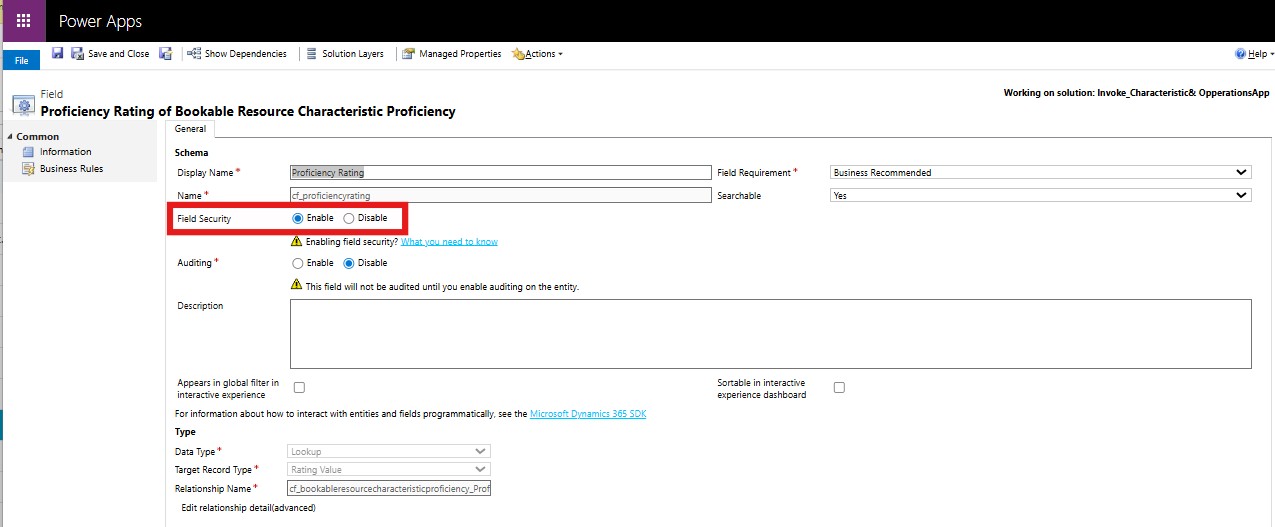
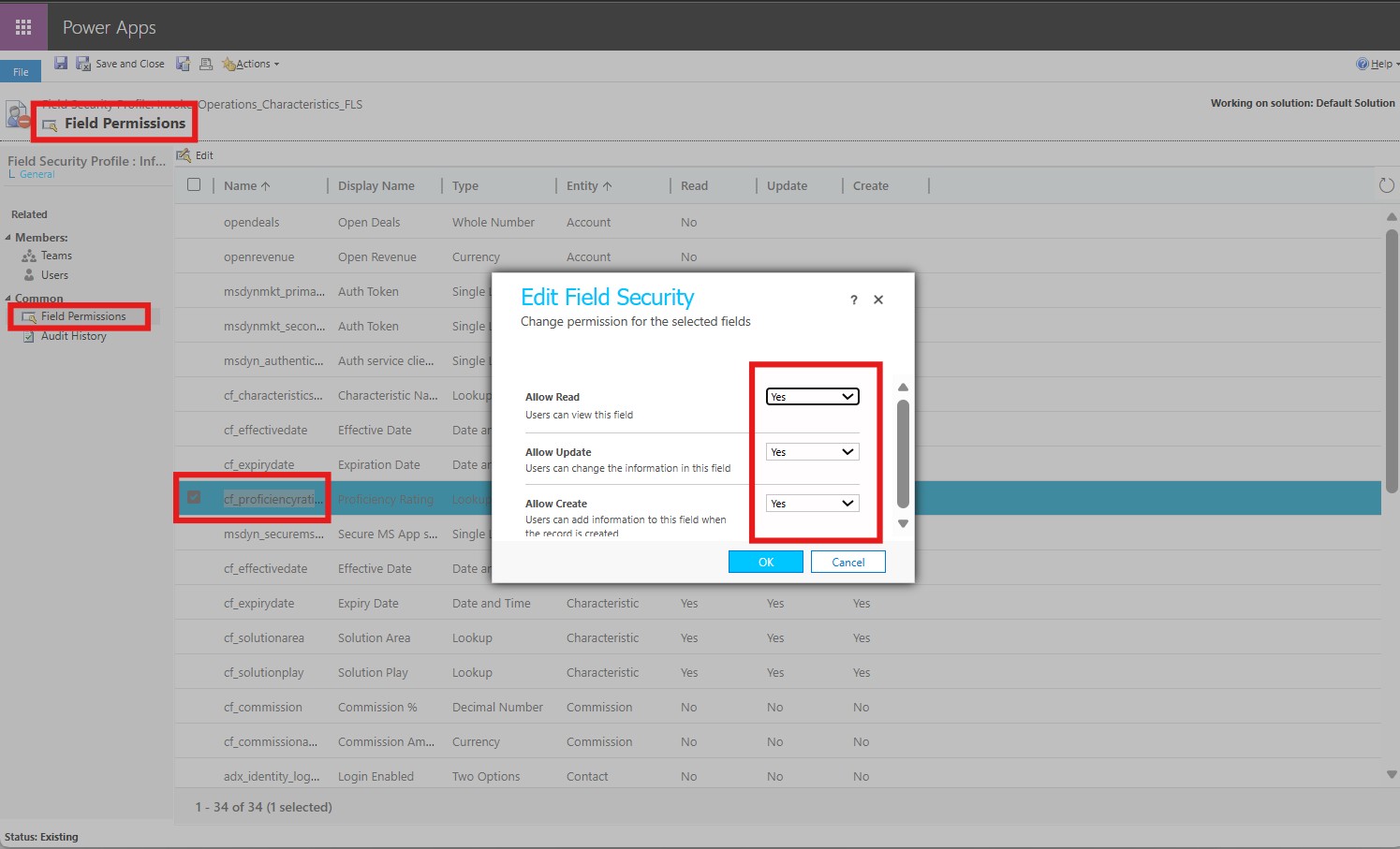
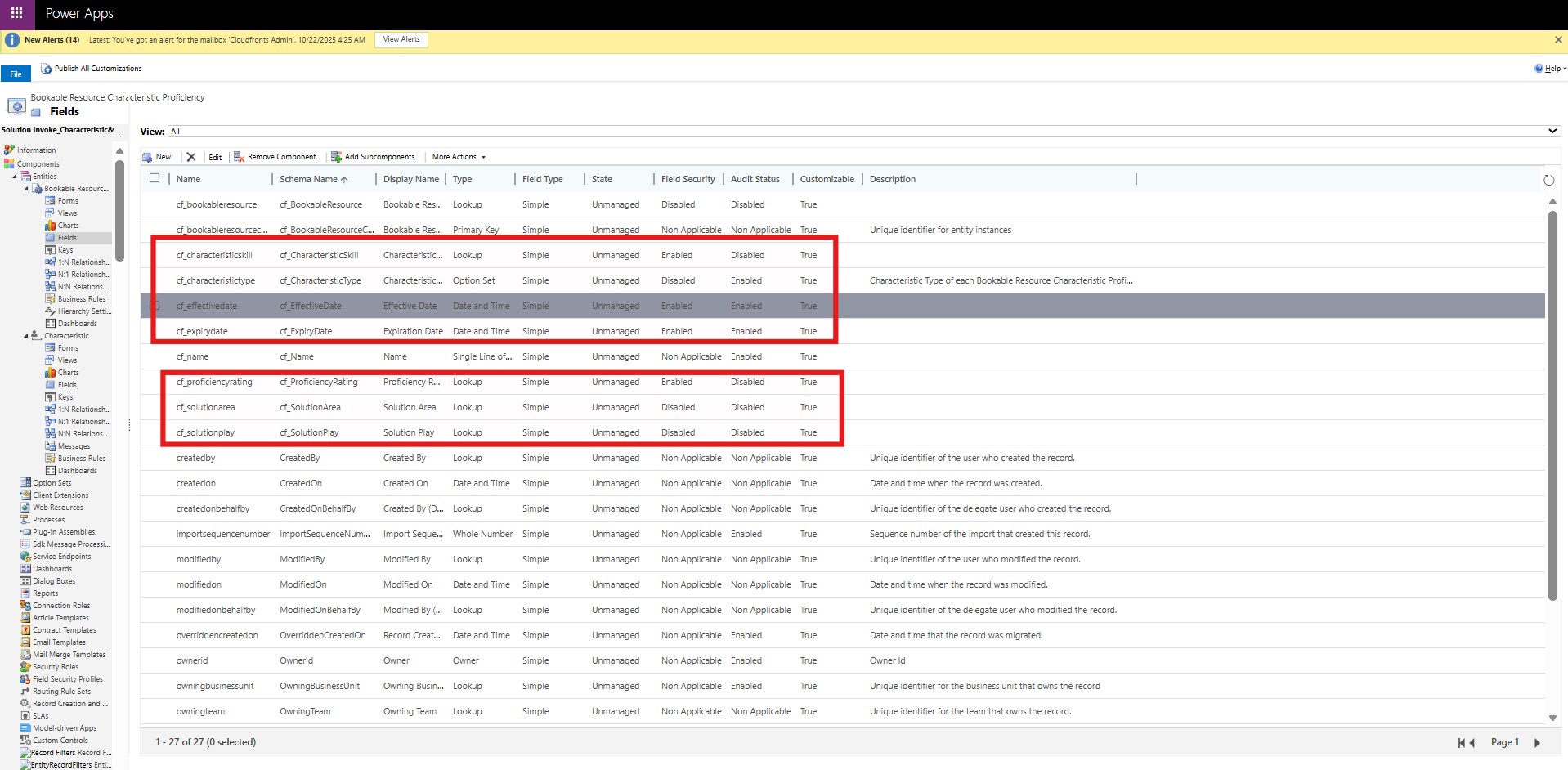
      Step 1: Go to your Solution & Identify Sensitive Fields, usually Personal info, facts & figures, etc. e.g. cf_proficiencyrating.

      Step 2: Select the field and “Enable” it for Field Level Security (This is not possible for MS Out of the Box fields)

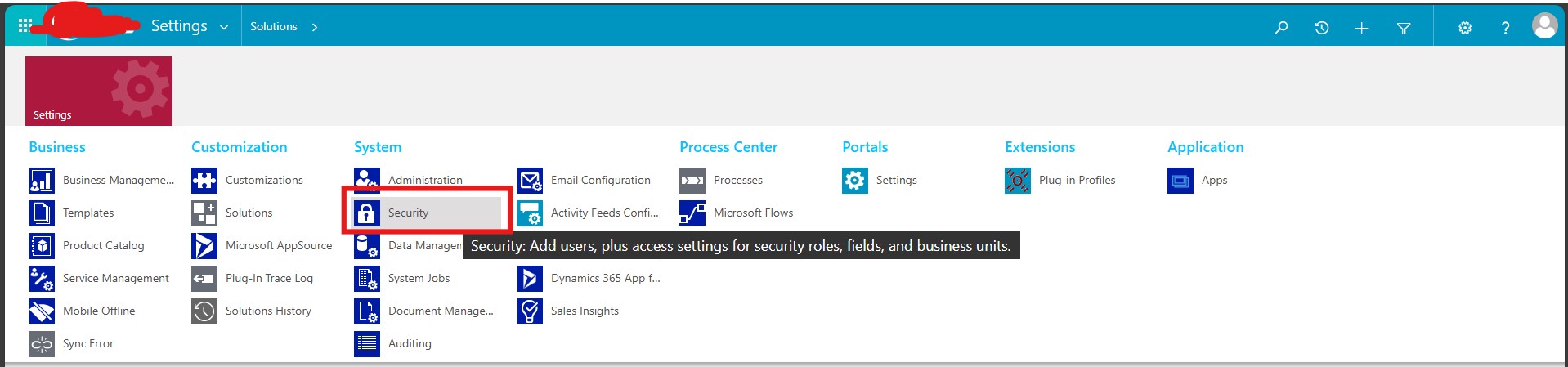
      Step 3: Go to Settings and then select “Security”

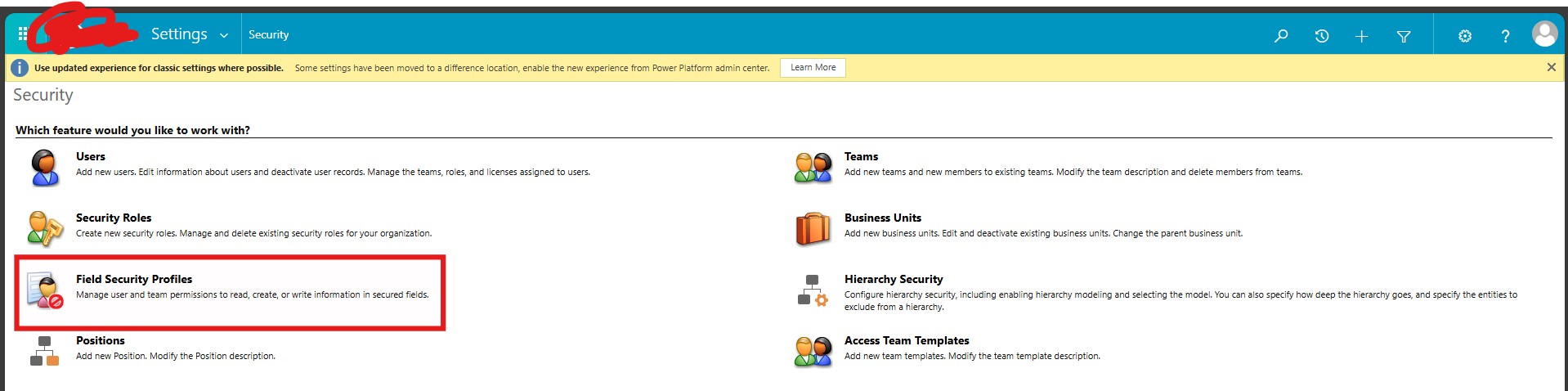
      Step 4: Go to Settings and then select “Security” -> “Field Security Profiles”

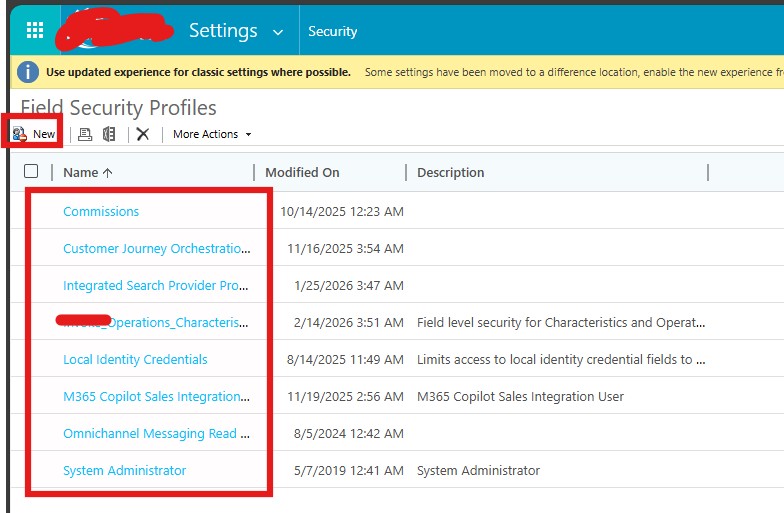
      Step 5: Either create or use existing Field Security Profile, as required

      Step 6: Within this one can see all the fields across Dataverse which are enabled for Field Security, Here the user should select their field and set create/read/update privileges (Yes/No).

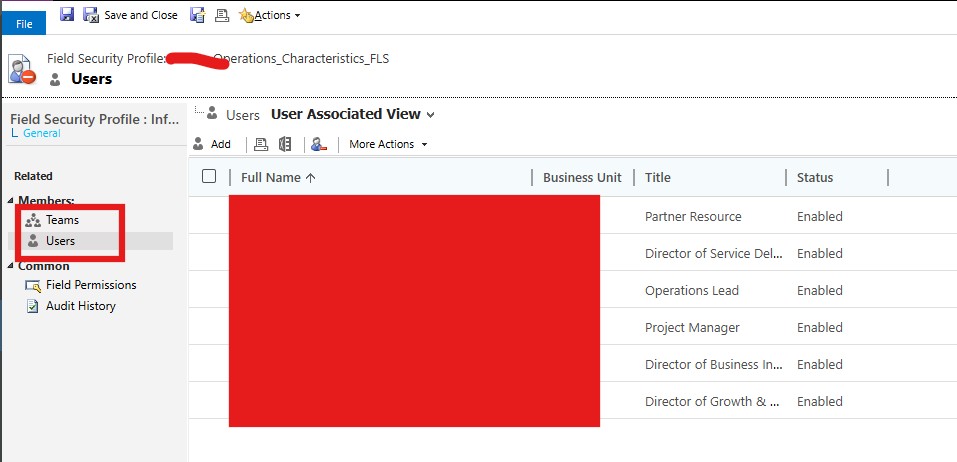
      Step 7: Then select the system users, or the Team (having the stakeholder users), and save it.

      Results:

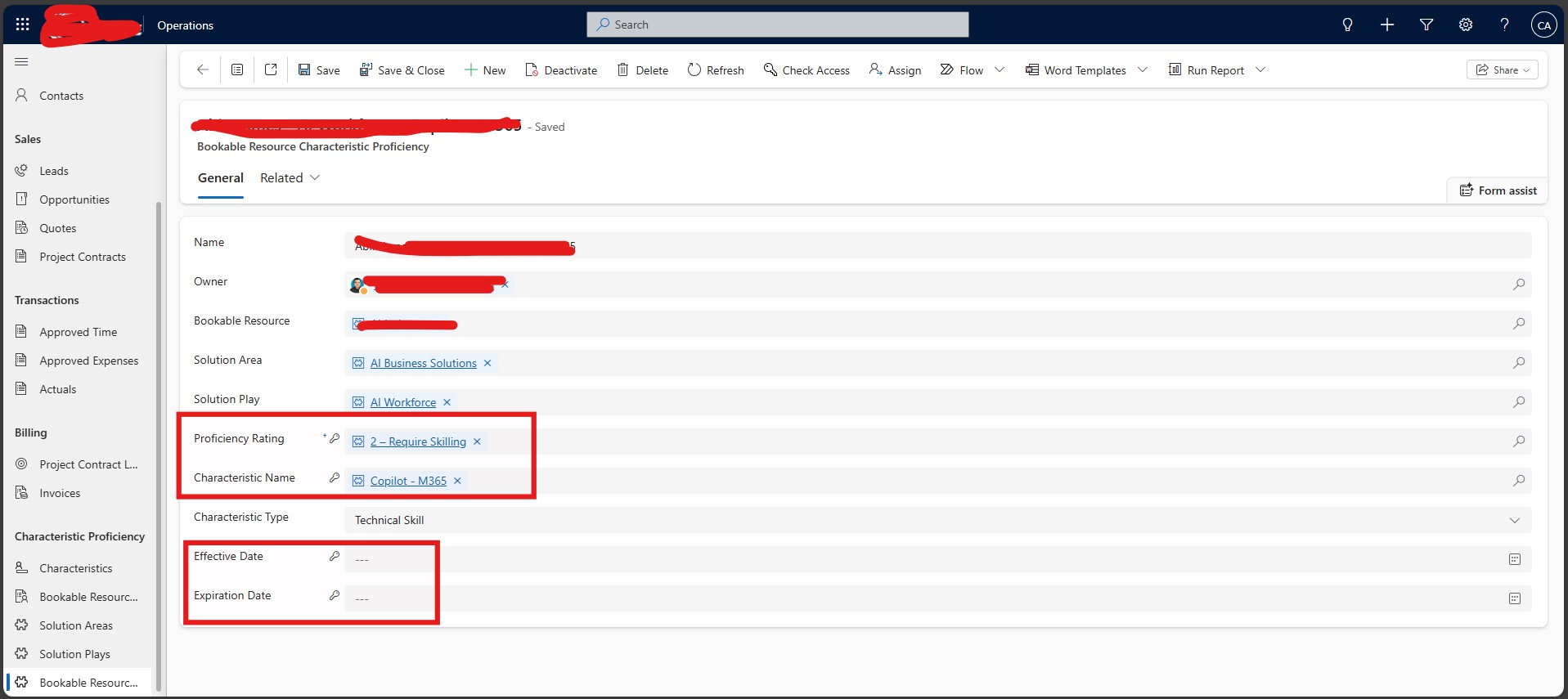
      Assume you are a user from X dept. who wants to access Entity 2 Record, and you need to see only the Proficiency Rating & Characteristic Name, but not Effective Date & Expiration Date; now since all fields have Field Level Security they would have a Key Icon on them, but the fields which do not have read/write access for you/your team, would have the Key Icon as well as a “—“.

      The same thing would happen in Views, subgrids, as well as if the user uses Advanced Find.


      Why this Solution was Required?

      The organization needed:

      • 1] Cross-functional collaboration
      • 2] Protection of confidential internal data
      • 3] Clear separation of duties
      • 4] No disruption to operational workflows

      They required a solution that:

      • 1] Did not block entity access
      • 2] Did not require custom development
      • 3] Enforced true data-level protection

      Business Impact

      1. Confidential Data Protection
      Sensitive internal data was secured without restricting overall entity access, enabling controlled collaboration.

      2. Reduced Internal Data Exposure Risk
      Unauthorized users could no longer retrieve protected fields via Advanced Find, significantly lowering governance risk.

      3. Clear Separation of Duties
      Departmental ownership of sensitive fields was enforced without disrupting cross-functional visibility.

      4. Improved Audit Readiness
      Every modification to protected fields became traceable, strengthening accountability and compliance posture.

      5. Reduced Operational Friction
      System-enforced field restrictions eliminated the need for entity blocking, duplicate records, and manual approval workarounds.

      6. Efficiency Gains
      The solution was delivered through configuration — no custom code, no complex business rules, and minimal maintenance overhead.

      I hope you have found this Blog helpful, if you have any other queries, please reach me out at Shashank Keny | LinkedIn

    Plugin Class Code Recovery using XRMToolBox & C# DotPeek

    In an ideal Dynamics 365 (Dataverse) project, plugin source code lives safely in a version-controlled repository, flows cleanly through Azur...